Not an Incremental Improvement#
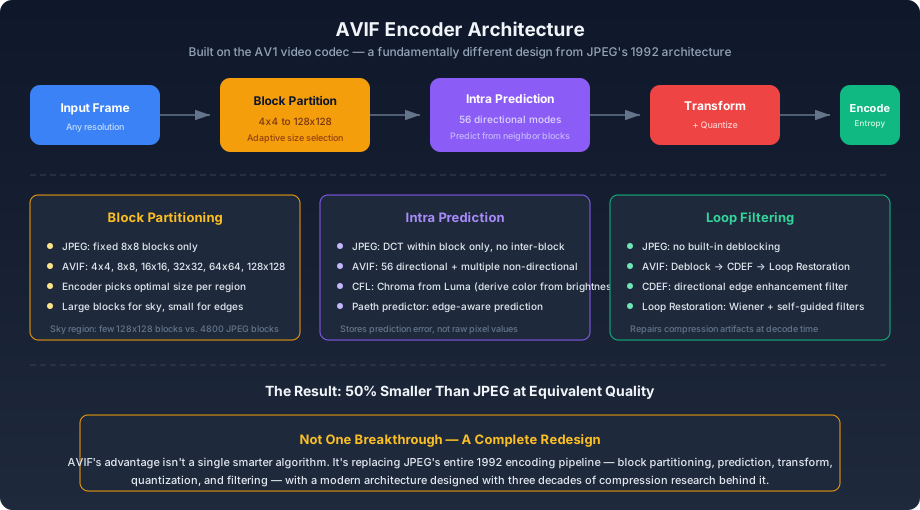
JPEG is based on 1992 technology. WebP optimized JPEG's framework — variable block sizes, better prediction, arithmetic coding — but kept the same fundamental architecture: DCT transform on blocks, quantization, entropy coding. AVIF is built on the AV1 video codec, designed from scratch in the late 2010s with no obligation to be compatible with anything that came before.
AVIF is not an upgraded JPEG. It is a different category of thing.
The Numbers#
At equivalent perceived quality:
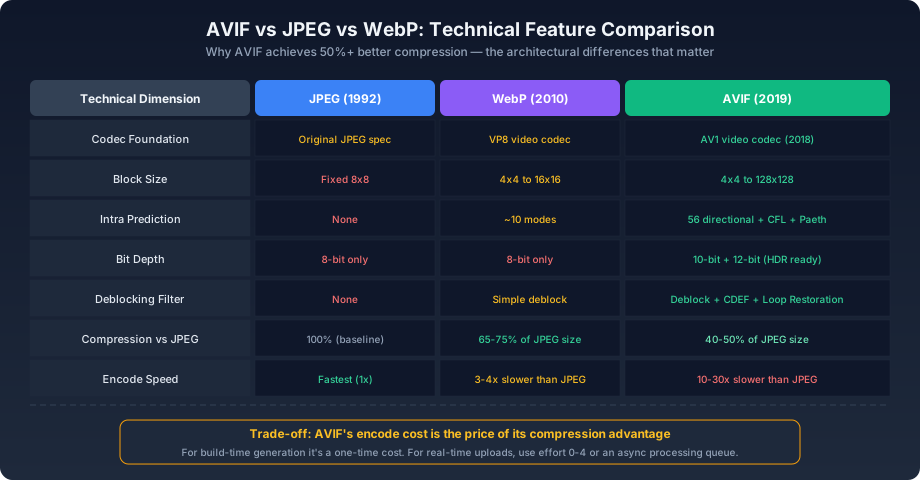
| Format | Relative File Size |
|---|---|
| JPEG | 100% (baseline) |
| WebP | 65–75% |
| AVIF | 40–50% |
A 200KB JPEG becomes roughly 80–100KB as AVIF, with no visible quality difference.
The Technical Advantages, Piece by Piece#
Block Partitioning: 4x4 to 128x128#
JPEG's blocks are fixed at 8x8 pixels. Every structure, gradient, and texture that spans more than 8 pixels must be encoded across block boundaries, losing the ability to exploit large-scale patterns. A clear blue sky in a photograph needs roughly 4,800 separate 8x8 blocks in JPEG — each encoded independently, each wasting bits on the same uniform color.
AVIF can use blocks from 4x4 (for fine detail) up to 128x128 pixels (for smooth, uniform regions). The encoder analyzes each region and picks the block size that minimizes the bit cost. A sky region might be covered by a handful of 128x128 super-blocks. A detailed edge region gets 4x4 or 8x8 blocks. The encoder adapts, and the bit savings on uniform regions are substantial.
Intra Prediction: 56 Directional Modes#
JPEG's DCT operates inside a single 8x8 block. It has no mechanism to exploit similarity between adjacent blocks — each block is an island.
AVIF's intra prediction uses already-encoded neighboring blocks to predict the content of the current block. The encoder only needs to store the prediction error — the difference between the prediction and the actual pixels. For content with directional structure (fabric textures, wood grain, hair, architectural lines), one of the 56 directional prediction modes will closely match the actual content, making the prediction error small and cheap to encode.
Beyond directional modes, AVIF includes:
- CFL (Chroma from Luma): Predicts chroma channels from the already-decoded luma channel. Since brightness and color are correlated in natural images, this is surprisingly effective and costs almost nothing.
- Paeth predictor: An edge-aware predictor that selects among neighboring pixels based on which direction has the smallest gradient. Simple, fast, and effective at edges.
- Recursive filtering modes: Apply a filter to neighboring pixels before using them for prediction, smoothing out noise that would otherwise inflate the prediction error.
JPEG has none of this. Its DCT transform has no concept of what neighboring blocks contain.
Loop Filtering: Repairing Artifacts at Decode Time#
Lossy compression introduces artifacts — the most visible being block boundaries where adjacent blocks were quantized differently. JPEG has no built-in mechanism to hide these. WebP has a simple deblocking filter that smooths block edges.
AVIF has a three-stage filtering pipeline applied during decoding:
- Deblocking filter: Smooths the boundaries between blocks, hiding the most visible quantization artifact.
- CDEF (Constrained Directional Enhancement Filter): A directional filter that sharpens edges along the dominant direction while avoiding overshoot. It restores crispness to edges that quantization softened.
- Loop Restoration: Applies Wiener filters (which minimize the mean squared error between the filtered and original signal) and self-guided filters to restore texture and detail that quantization removed.
This pipeline means AVIF can quantize more aggressively — discarding more data — because the decoder will partially reconstruct what was lost. JPEG cannot quantize as aggressively because it has no recovery mechanism; the artifacts would be immediately visible.
10-bit and 12-bit Color Depth#
JPEG and WebP are limited to 8 bits per channel — 256 levels of brightness. In a smooth gradient (a sky transitioning from light blue to dark blue at dusk), 256 levels are often insufficient. You see banding — visible steps where the color jumps from one level to the next.
AVIF supports 10-bit (1,024 levels) and 12-bit (4,096 levels) color. The extra precision eliminates banding entirely for SDR content. It also gives the encoder finer control during quantization — it can discard information at a more granular level, keeping just enough to avoid visible steps.
This matters increasingly for HDR content, where the luminance range is far wider and banding would be even more visible with only 256 levels.
Adaptive Chroma Handling#
JPEG applies chroma subsampling uniformly: the entire image gets the same 4:2:0 treatment, regardless of content. AVIF can vary its chroma handling spatially — preserving full chroma resolution in regions with fine color detail while subsampling aggressively in regions where color is uniform. This adaptivity is free at encode time and invisible at decode time, but it saves bits where they'd be wasted.
The Catch: Encoding Speed#
js1async function encodeBenchmark(inputPath, iterations = 3) {2 console.time('JPEG');3 for (let i = 0; i < iterations; i++) {4 await sharp(inputPath).jpeg({ quality: 85 }).toBuffer();5 }6 console.timeEnd('JPEG');7 8 console.time('AVIF');9 for (let i = 0; i < iterations; i++) {10 await sharp(inputPath).avif({ quality: 55, effort: 4 }).toBuffer();11 }12 console.timeEnd('AVIF');13}
effort parameter (0–9) trades encode time for compression efficiency:- effort 0–3: Fast, lower compression. Suitable for real-time processing.
- effort 4–6: Balanced. Recommended for production use where build-time encoding is acceptable.
- effort 7–9: Very slow, best compression. Only practical for offline/batch processing.
At effort 4, AVIF encoding is roughly 5–15x slower than JPEG. For static site builds, this is a one-time cost paid at build time. For real-time user upload processing, you either use a lower effort setting, an async queue (accept the upload, process in the background, swap when ready), or stay on WebP for the upload path while serving pre-generated AVIF elsewhere.
The gap is narrowing. Apple's M-series chips include AV1 hardware encoding. Dedicated encoding libraries like rav1e prioritize speed over absolute compression. And libaom, the reference encoder, improves with every release. The question is not whether AVIF encoding will become fast enough — it's when.
Deployment#
For New Projects#
Generate AVIF and WebP together. Serve AVIF to the 94%+ of browsers that support it, WebP to the remainder, and JPEG or PNG as the final fallback:
html1<picture>2 <source srcset="photo.avif" type="image/avif" />3 <source srcset="photo.webp" type="image/webp" />4 <img src="photo.jpg" alt="Description" />5</picture>
For Existing Projects#
Migrate by impact, not alphabetically. Start with the largest images — hero sections, article covers, product detail photos — where the absolute byte savings are largest. Work down to thumbnails and decorative elements last.
Quality Parameters for Production#
js1const AVIF_PRESETS = {2 photo: { quality: 55, effort: 4 },3 photoCompact: { quality: 40, effort: 5 },4 photoTransparent: { quality: 50, alphaQuality: 90, effort: 4 },5 lossless: { lossless: true, effort: 6 },6};
AVIF quality 50–55 is the perceptual equivalent of JPEG 80–85. The numerical values differ because the underlying rate-control models differ — don't port quality settings directly between formats.
Why It Works#
AVIF's compression advantage isn't one breakthrough. It's the cumulative effect of replacing every component of JPEG's 1992 pipeline — block partitioning, prediction, transform, quantization, and filtering — with modern equivalents designed with thirty years of compression research behind them. Each individual improvement is incremental. Combined, they produce files half the size.