Where WebP Stands Today#
Google released WebP in 2010 with a specific goal: a single format that could do JPEG-grade lossy compression and PNG-grade lossless-with-transparency, all in smaller files. Fifteen years later, browser support sits above 97%. Every major CDN supports on-the-fly WebP conversion. Build tools generate WebP variants automatically.
So the question seems to answer itself: convert everything to WebP and move on. But the honest answer is messier than that. WebP is the best choice for most web images today — and a bad choice for a meaningful minority of use cases. Knowing which camp your project falls into is what matters.
What WebP Actually Solves#
Against JPEG#
Same photo, equivalent perceived quality:
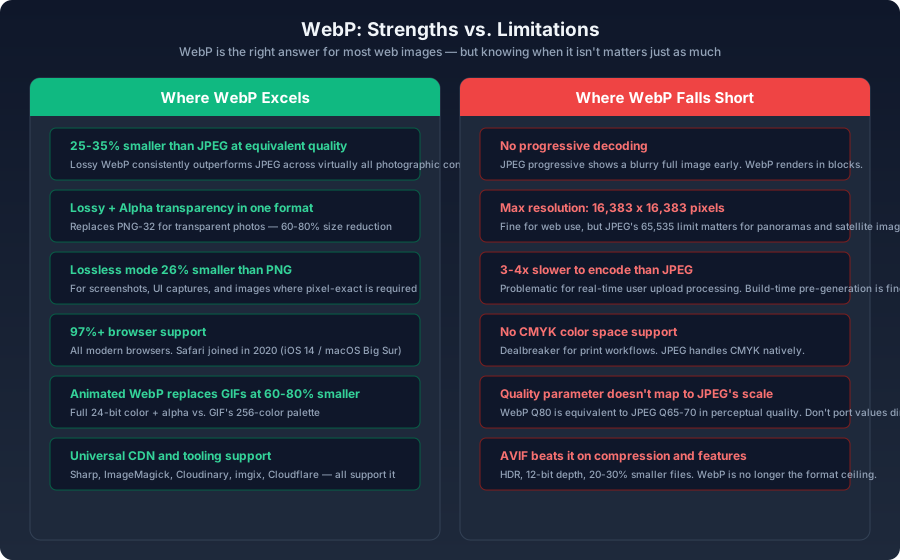
- Lossy WebP produces files 25–35% smaller than JPEG
- WebP supports an alpha channel for transparency (JPEG cannot)
- WebP has a lossless mode (JPEG cannot — even at quality 100, JPEG is still lossy)
Against PNG#
- Lossless WebP files are roughly 26% smaller than PNG equivalents
- Lossy WebP with alpha transparency is 60–80% smaller than PNG-32 for the same content
js1const sharp = require('sharp');2 3async function compareFormats(inputPath) {4 const [webp, png, jpeg] = await Promise.all([5 sharp(inputPath).webp({ quality: 80 }).toBuffer(),6 sharp(inputPath).png({ quality: 80 }).toBuffer(),7 sharp(inputPath).jpeg({ quality: 80, mozjpeg: true }).toBuffer(),8 ]);9 10 console.log({11 webp: `${(webp.length / 1024).toFixed(1)} KB`,12 png: `${(png.length / 1024).toFixed(1)} KB`,13 jpeg: `${(jpeg.length / 1024).toFixed(1)} KB`,14 });15}
For most websites, converting PNG photos with transparency to lossy WebP with alpha is the single largest file-size win available — often 70% or more per image.
The Problems You Need to Know About#
Encoding Time#
WebP lossy encoding is 3–4x slower than JPEG. Lossless encoding is slower still:
bash1# Rough benchmarks for a 4000px source image2# JPEG (mozjpeg): ~200ms3# WebP lossy: ~800ms4# WebP lossless: ~3000ms
For static sites where images are processed at build time, this is irrelevant — it runs once and the result is cached forever. For applications that process user uploads in real time, the CPU cost is real and needs to be factored in. A queue-based async processing model (upload first, convert in the background, swap when ready) is the standard workaround.
Maximum Dimensions#
WebP caps at 16,383×16,383 pixels. For normal web images this is more than enough. For ultra-high-resolution panoramas, satellite imagery, or deep-zoom photography, JPEG's 65,535×65,535 ceiling gives substantially more room.
No Progressive Decoding#
Progressive JPEG loads a blurry full-image preview first, then sharpens it incrementally. On a slow connection, the user sees the whole picture after a fraction of the file has arrived. WebP has no equivalent. It renders block-by-block as data arrives.
This is a genuine UX downgrade in some contexts. A 500KB progressive JPEG shows a recognizable blurry image after about 80KB arrives. A 350KB WebP may not show a complete image until nearly the entire file is downloaded. On fast connections the difference is imperceptible. On 3G or spotty 4G, progressive JPEG can feel faster even though it's transferring more bytes.
No CMYK Color Space#
WebP is RGB-only. If your workflow involves print or prepress and your images move through CMYK at any point, WebP won't work. JPEG supports CMYK natively.
Quality Scale Doesn't Map to JPEG's#
A common mistake: taking a JPEG quality of 85 and applying it directly to WebP. The scales are different. WebP quality 80 produces perceptual quality roughly equivalent to JPEG quality 65–70 — it's more aggressive at the same numerical value:
js1// WebP quality 75-80 is the sweet spot for most photos2sharp(input).webp({ quality: 78 }).toFile('output.webp');
The good news is that the range of useful quality values is narrower for WebP. Where JPEG might be used anywhere from 60 to 95 depending on content, WebP's practical range is roughly 65–85. Above 85, file sizes balloon with no visible gain.
Safari Joined Late#
<picture> fallback:html1<picture>2 <source srcset="photo.webp" type="image/webp" />3 <img src="photo.jpg" alt="Description" />4</picture>
<picture> element handles this cleanly — the browser picks the first <source> it can decode, and falls through to the <img> if none match.Where WebP Is the Clear Winner#
| Scenario | Verdict | Rationale |
|---|---|---|
| Static site images | Strong yes | Build-time generation eliminates encoding time concerns |
| Photography portfolio | Yes | Large photos benefit most from WebP's compression advantage |
| Icons / logos | Use SVG | Vector formats beat raster at any compression level |
| Transparent photos | Strong yes | PNG-32 is the worst-performing format for this; WebP is 60-80% smaller |
| Real-time user uploads | Cautious | Budget for the encoding CPU cost or add async processing |
| Print / CMYK workflow | No | WebP does not support CMYK at all |
| GIF replacement | Yes | 60%+ smaller with full 24-bit color instead of 256 palette entries |
| Maximum compatibility required | No | JPEG is the only format with universal decode support |
Should You Skip WebP and Go Straight to AVIF?#
If you're building a new project today, the natural question is whether to bypass WebP entirely and go directly to AVIF. The answer depends on your audience:
- AVIF produces files 20–30% smaller than WebP at equivalent quality. It also fixes several WebP limitations: HDR support, higher bit depth (10–12 bit vs. 8-bit), larger maximum dimensions, and better gradient handling.
- But AVIF encodes 3–10x slower than WebP, and browser support, while strong at 94%+, still lags behind WebP's 97%+.
html1<picture>2 <source srcset="photo.avif" type="image/avif" />3 <source srcset="photo.webp" type="image/webp" />4 <img src="photo.jpg" alt="Description" />5</picture>
<picture> source order is the priority order. The browser tries AVIF first, falls back to WebP, then lands on JPEG. The incremental build-time cost of generating a second modern format is negligible; the only real cost is storage, and for most projects, storing three variants of each image is a trivial expense compared to the bandwidth savings.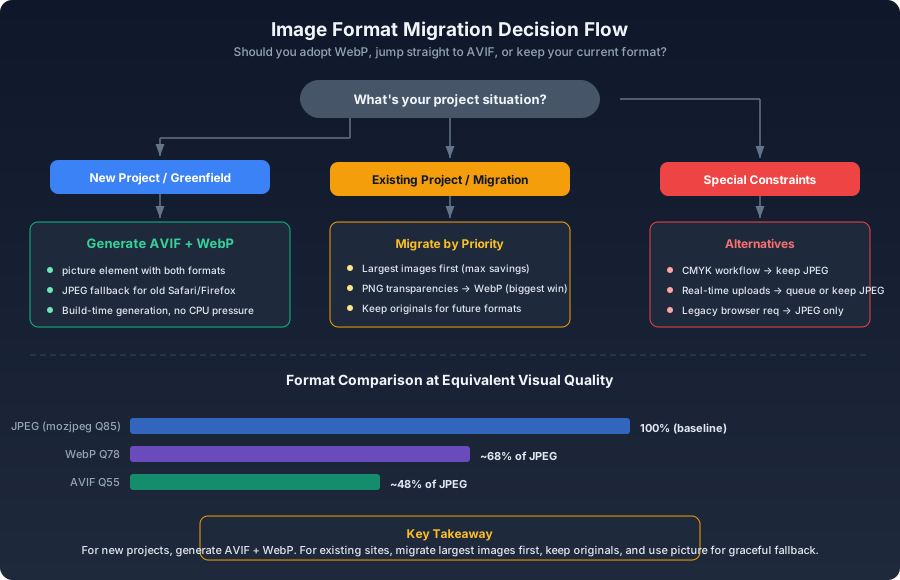
Migration Strategy#
Don't Convert Everything at Once#
If you're migrating an existing site, prioritize by impact:
- Largest images first. A 2MB PNG hero image converted to 300KB WebP delivers more absolute savings than converting fifty 5KB icons.
- PNG transparencies. These show the biggest percentage wins — often 70% or more per image.
- Images at a fixed display size. You can tune quality precisely when you know the exact rendered dimensions.
Keep the Originals#
Always retain the original high-resolution source files. Formats evolve. If JPEG XL becomes widely supported in three years, re-encoding from the original will produce better results than re-encoding from an already-lossy WebP. Storage is cheap. Re-shooting or re-acquiring source files is not.
Automate the Conversion#
js1const sharp = require('sharp');2const { glob } = require('glob');3 4async function convertToWebP() {5 const images = await glob('public/images/**/*.{jpg,jpeg,png}');6 7 for (const img of images) {8 const outPath = img.replace(/\.(jpe?g|png)$/i, '.webp');9 const metadata = await sharp(img).metadata();10 11 await sharp(img)12 .webp({13 quality: 78,14 alphaQuality: 90,15 })16 .toFile(outPath);17 18 const webpBuf = await sharp(outPath).toBuffer();19 console.log(`${img}: ${(metadata.size / 1024).toFixed(0)}KB → ${(webpBuf.length / 1024).toFixed(0)}KB`);20 }21}
Summary#
WebP is the right format for the majority of web images today. It's not the end state — AVIF is already better on most technical dimensions, and whatever comes after AVIF will push the envelope further. But for a format with 97%+ support, excellent compression, and universal tooling integration, WebP is the most pragmatic upgrade most sites can make right now.
The exceptions are real but narrow: CMYK workflows, real-time processing without async queues, and projects where progressive loading is a hard requirement. For everything else, the migration is worth the effort — start with the biggest images first and work down.