The Format Landscape#
Web image formats have transformed in the past decade. For most of the web's history, there were two formats: JPEG for photos, PNG for graphics that needed transparency or pixel-exact rendering. That was the entire decision tree.
WebP arrived in 2010 and took a decade to reach universal browser support. AVIF followed in 2019, standardized on top of the AV1 video codec, and reached critical browser mass by 2023. Developers now have more options — and more decisions to make.
This comparison evaluates the four formats across the dimensions that matter for real-world web use: compression efficiency, encoding and decoding performance, feature support, browser compatibility, and actual visual quality on different types of content.
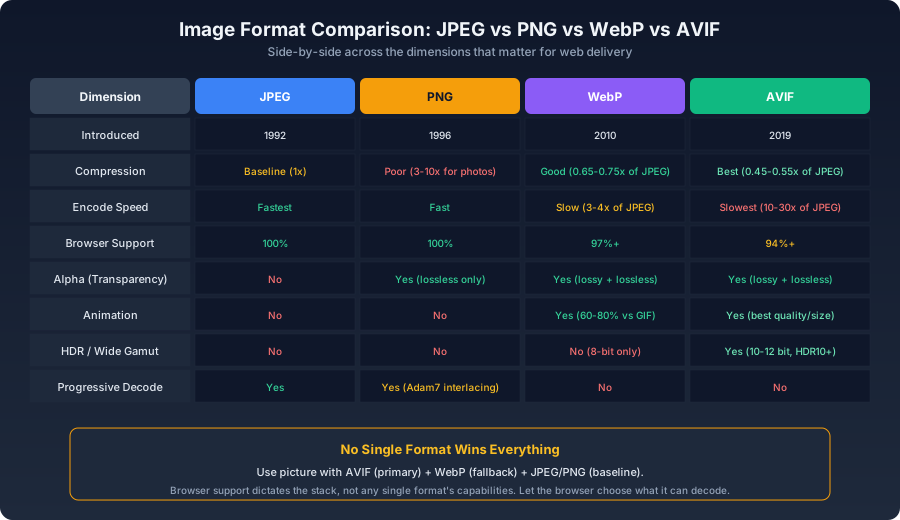
Quick Reference#
| Feature | JPEG | PNG | WebP | AVIF |
|---|---|---|---|---|
| Introduced | 1992 | 1996 | 2010 | 2019 |
| Lossy compression | Yes | No | Yes | Yes |
| Lossless compression | No | Yes | Yes | Yes |
| Alpha transparency | No | Yes | Yes | Yes |
| Animation | No | No | Yes | Yes |
| Max dimensions | 65,535×65,535 | 2³¹−1 × 2³¹−1 | 16,383×16,383 | 2³¹−1 × 2³¹−1 |
| Bit depth | 8-bit | 1–16 bit | 8-bit | 8–12 bit |
| HDR support | No | No | No | Yes |
| Progressive decode | Yes | Yes (Adam7) | No | No |
| Browser support | 100% | 100% | 97%+ | 94%+ |
Compression Efficiency#
Using the same source photo, targeting "no visible quality difference" for each format:
js1const sharp = require('sharp');2 3async function formatComparison(inputPath) {4 const configs = {5 jpeg: { format: 'jpeg', quality: 85, mozjpeg: true },6 webp: { format: 'webp', quality: 78 },7 avif: { format: 'avif', quality: 55 },8 png: { format: 'png', quality: 85 },9 };10 11 const results = {};12 for (const [name, cfg] of Object.entries(configs)) {13 const buffer = await sharp(inputPath)[cfg.format]({14 quality: cfg.quality,15 }).toBuffer();16 17 results[name] = {18 sizeKB: (buffer.length / 1024).toFixed(1),19 };20 }21 22 const jpegSize = parseFloat(results.jpeg.sizeKB);23 for (const name of Object.keys(results)) {24 results[name].relativeToJPEG = `${(parseFloat(results[name].sizeKB) / jpegSize).toFixed(2)}x`;25 }26 27 console.table(results);28}
Typical results for a 1200px-wide photograph:
| Format | Relative Size | Notes |
|---|---|---|
| PNG | 3–10x | Catastrophically inefficient for photographic content |
| JPEG (mozjpeg, Q85) | 1x | The baseline |
| WebP (Q78) | 0.65–0.75x | Roughly 30% smaller than JPEG at equivalent quality |
| AVIF (Q55) | 0.45–0.55x | Roughly 50% smaller than JPEG at equivalent quality |
PNG's numbers deserve explanation. PNG is a lossless format optimized for graphics with flat color areas, sharp edges, and limited palettes. Apply it to a photograph with millions of colors and subtle gradients, and the DEFLATE compression simply cannot find enough patterns to compress effectively. The result is files 3–10x larger than JPEG — all for zero visual benefit, since the extra bytes represent noise and texture the eye cannot distinguish from lossy approximations.
AVIF's 50% advantage over JPEG is not a marginal improvement. For a site with 100MB of JPEG images, switching to AVIF saves roughly 50MB of transfer per full page load — and for repeat visitors, those savings compound across every session.
Encoding Performance#
Encoding speed matters for two scenarios: build-time processing (where it affects CI duration) and real-time user upload processing (where it affects perceived responsiveness).
js1async function benchmarkEncoding(inputPath, iterations = 10) {2 const formats = [3 { name: 'jpeg', fn: () => sharp(inputPath).jpeg({ quality: 85, mozjpeg: true }).toBuffer() },4 { name: 'webp', fn: () => sharp(inputPath).webp({ quality: 78 }).toBuffer() },5 { name: 'avif', fn: () => sharp(inputPath).avif({ quality: 55 }).toBuffer() },6 { name: 'png', fn: () => sharp(inputPath).png({ quality: 85 }).toBuffer() },7 ];8 9 for (const fmt of formats) {10 const start = performance.now();11 for (let i = 0; i < iterations; i++) await fmt.fn();12 console.log(`${fmt.name}: ${((performance.now() - start) / iterations).toFixed(0)}ms avg`);13 }14}
AVIF encoding can be 10–30x slower than JPEG. This is its primary weakness and the reason it hasn't fully displaced WebP. The gap is narrowing — Apple's M-series chips include AVIF hardware encoding, libaom continues to improve per release, and there are faster (though slightly less efficient) AVIF encoders like rav1e — but for now, AVIF encoding remains an order of magnitude more expensive than JPEG.
For static site builds, this is manageable: images are processed once, the output is cached, and the extra encoding time is a one-time cost. For real-time upload pipelines, you either accept the latency, use a queue-based async model, or stay on WebP for the upload path while serving pre-generated AVIF elsewhere.
Browser Compatibility#
html1<picture>2 <source srcset="photo.avif" type="image/avif" />3 <source srcset="photo.webp" type="image/webp" />4 <img src="photo.jpg" alt="Description" width="1200" height="800" />5</picture>
<picture> element tries sources in order. The browser skips any MIME type it cannot decode and falls through to the <img> fallback. This means you can serve AVIF to 94%+ of users, WebP to the next 3%, and JPEG to the remainder — all from a single block of HTML.Support milestones as of 2026:
- AVIF: Chrome 85+, Firefox 93+, Safari 16.0+ (iOS 16 / macOS 13), Edge 85+
- WebP: Chrome 23+, Firefox 65+, Safari 14+ (iOS 14 / macOS Big Sur), Edge 18+
Safari is the limiting factor for both formats. If your audience includes significant traffic from pre-2020 Apple devices (Safari <14), you need JPEG fallbacks. If everyone is on iOS 16+ and macOS 13+, you can drop the WebP middle tier and go straight AVIF + JPEG.
Visual Quality on Different Content Types#
Mathematical quality metrics (SSIM, PSNR) don't fully capture what the eye sees. Actual visual behavior varies by content:
Gradients and Smooth Tonal Transitions#
AVIF substantially outperforms JPEG and WebP here. JPEG's 8-bit pipeline and block-based DCT produce visible banding in skies, studio backgrounds, and any area with gradual color transitions. AVIF's 10–12 bit depth and more sophisticated coding tools render gradients that look essentially continuous. WebP sits between the two — better than JPEG, but still limited by its 8-bit pipeline.
Text and Sharp Edges#
Lossy JPEG and WebP both produce "ringing artifacts" around high-contrast edges — faint halos where the frequency-domain quantization smears sharp transitions. This makes them poor choices for screenshots, UI captures, and images that contain text. PNG renders text with pixel-level sharpness. AVIF preserves edges noticeably better than WebP, though for true pixel-exact work, lossless remains the only option.
Faces and Skin Tones#
JPEG has an accidental advantage here: its characteristic noise pattern gives skin a natural-looking texture. WebP and AVIF at aggressive quality settings can over-smooth skin, producing a slightly plastic look — the compression mistakes skin texture for noise and removes it. This is something to check when setting quality parameters. Bumping quality slightly for images that prominently feature faces is often worth the bytes.
Shadow Detail and Dark Areas#
JPEG's block artifacts are most visible in dark areas, where quantization errors create visible 8×8 pixel boundaries. AVIF handles shadows better than any other web format — its higher bit depth and more modern coding tools preserve detail in near-black regions that JPEG turns into blocky mush.
The Format Decision Flow#
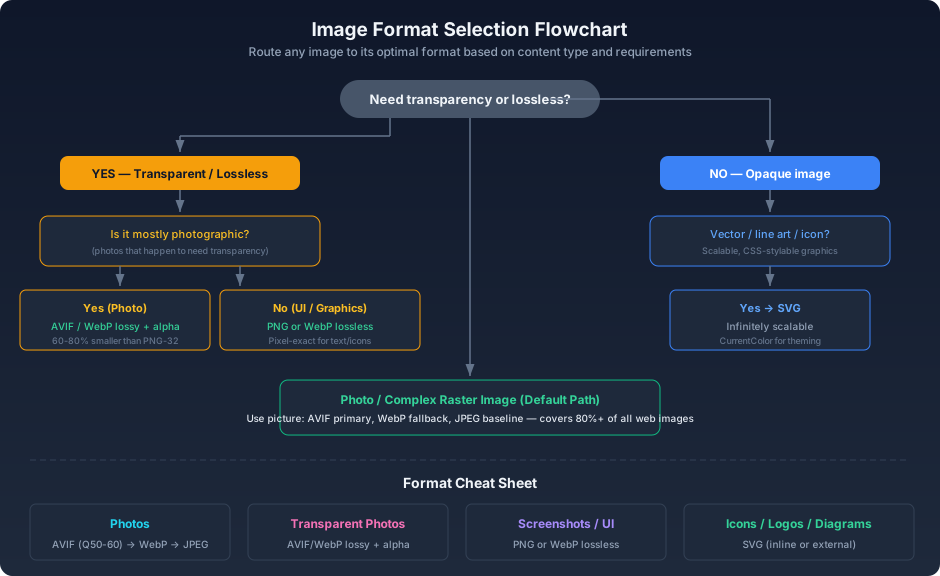
The flowchart routes any image to its optimal format. The most common path — a standard photograph without transparency — ends at the three-format stack: AVIF primary, WebP fallback, JPEG baseline. This single pattern covers roughly 80% of all images on the web.
Recommendations by Use Case#
| Use Case | Primary Format | Fallback |
|---|---|---|
| Photographs, complex images | AVIF | WebP → JPEG |
| Photos with transparency | AVIF (lossy + alpha) | WebP (lossy + alpha) |
| Icons, logos, UI graphics | SVG | PNG |
| Screenshots | PNG or WebP lossless | — |
| Animations | AVIF animated | WebP animated |
| Maximum compatibility | JPEG (mozjpeg) | — |
| Aggressive size targets | AVIF Q40–50 | — |
No single format wins every category. The best strategy isn't to pick one format — it's to use format negotiation. Provide 2–3 options and let the browser choose. Storage is cheap, bandwidth and user patience are not.