The Question#
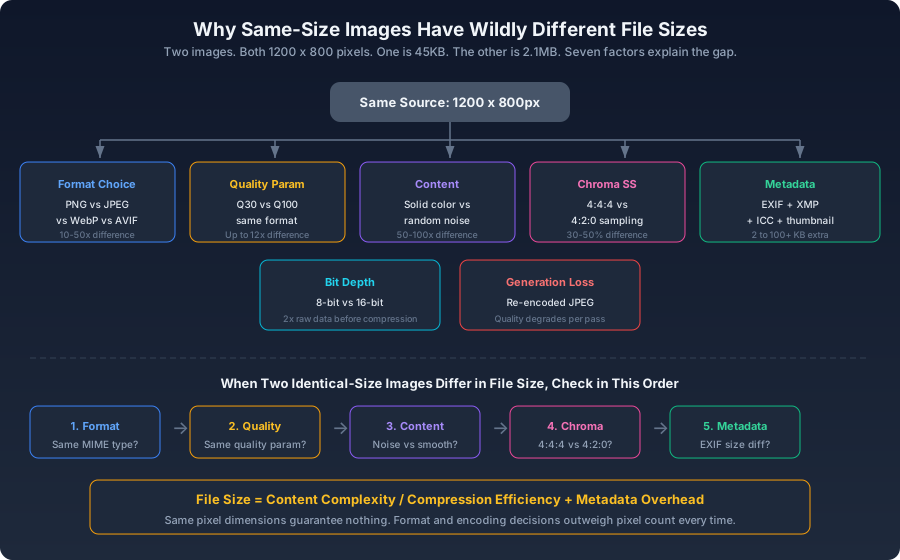
You have two images. Both are 1200 x 800 pixels. One is 58KB. The other is 687KB. They look perceptually identical — side by side, you wouldn't know which is which without checking the file size.
What accounts for a 12x difference between two images with the same pixel count?
The answer touches every core mechanism of image compression. Understanding it is understanding image optimization.
Running the Experiment#
js1const sharp = require('sharp');2 3async function sameSizeDifferentBytes(inputPath) {4 const results = {};5 6 const variants = [7 { name: 'JPEG Q100', fn: () => sharp(inputPath).resize(1200).jpeg({ quality: 100 }).toBuffer() },8 { name: 'JPEG Q85', fn: () => sharp(inputPath).resize(1200).jpeg({ quality: 85, mozjpeg: true }).toBuffer() },9 { name: 'JPEG Q60', fn: () => sharp(inputPath).resize(1200).jpeg({ quality: 60, mozjpeg: true }).toBuffer() },10 { name: 'JPEG Q30', fn: () => sharp(inputPath).resize(1200).jpeg({ quality: 30, mozjpeg: true }).toBuffer() },11 { name: 'WebP Q78', fn: () => sharp(inputPath).resize(1200).webp({ quality: 78 }).toBuffer() },12 { name: 'AVIF Q55', fn: () => sharp(inputPath).resize(1200).avif({ quality: 55 }).toBuffer() },13 { name: 'PNG lossless', fn: () => sharp(inputPath).resize(1200).png().toBuffer() },14 ];15 16 for (const v of variants) {17 const buffer = await v.fn();18 results[v.name] = `${(buffer.length / 1024).toFixed(1)} KB`;19 }20 21 console.table(results);22}
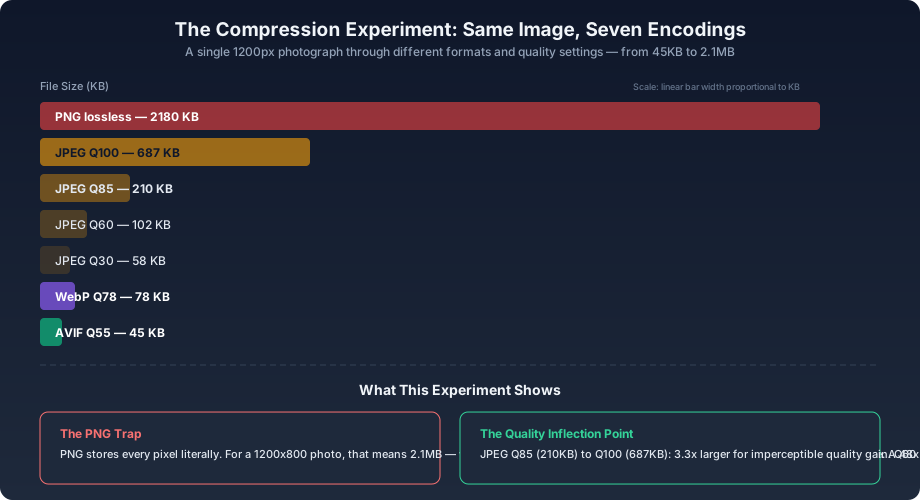
Typical output for a landscape photograph at 1200px wide:
| Format | File Size | Relative |
|---|---|---|
| PNG lossless | 2180 KB | 48.4x |
| JPEG Q100 | 687 KB | 15.3x |
| JPEG Q85 | 210 KB | 4.7x |
| JPEG Q60 | 102 KB | 2.3x |
| JPEG Q30 | 58 KB | 1.3x |
| WebP Q78 | 78 KB | 1.7x |
| AVIF Q55 | 45 KB | 1x (baseline) |
The same photograph, the same pixel dimensions, encoded seven different ways — a 48x spread from smallest to largest.
The Seven Factors#
1. Encoding Format#
Format choice is the single largest lever. PNG stores pixel values literally, applying only lossless DEFLATE compression. For photographic content with millions of colors and subtle gradients, DEFLATE finds few patterns to compress — the result is files 10–50x larger than lossy alternatives. AVIF, at the other end, uses the AV1 video codec's intra-frame compression tools, which are the most sophisticated available in any web image format. The format alone accounts for the majority of the 48x spread in the experiment above.
2. Quality Parameter#
Within the same format, the quality setting controls how much data the encoder discards. JPEG Q100 is not lossless — it still applies chroma subsampling and frequency-domain quantization — but it retains far more detail than Q30. The relationship is non-linear: moving from Q60 to Q85 roughly doubles file size for a subtle quality gain; moving from Q85 to Q100 triples it for an essentially imperceptible one. Every format has a quality range where the perceptual curve flattens while the byte-cost curve keeps climbing.
3. Image Content Complexity#
Compression exploits redundancy — adjacent pixels that are similar. A solid blue sky compresses to a fraction of the size of a forest canopy with thousands of tiny leaves at the same resolution and quality setting:
js1async function complexityTest() {2 const solid = await sharp({3 create: { width: 1200, height: 800, channels: 3,4 background: { r: 100, g: 150, b: 200 } }5 }).jpeg({ quality: 85 }).toBuffer();6 7 const noise = await sharp({8 create: { width: 1200, height: 800, channels: 3,9 background: { r: 100, g: 150, b: 200 },10 noise: { type: 'gaussian', mean: 0, sigma: 60 } }11 }).jpeg({ quality: 85 }).toBuffer();12 13 console.log({14 solid: `${(solid.length / 1024).toFixed(1)} KB`,15 noise: `${(noise.length / 1024).toFixed(1)} KB`,16 ratio: `${(noise.length / solid.length).toFixed(1)}x`,17 });18}
A solid-color image is routinely 1/50th to 1/100th the size of a random-noise image at the same resolution and compression settings. Real-world photos fall between these extremes.
4. Chroma Subsampling#
bash
The difference between 4:4:4 (every pixel gets full color data) and 4:2:0 (2x2 pixel blocks share one chroma sample) is typically 30–50% in file size. For photographs, the visual difference is negligible — the eye resolves luminance detail at far higher fidelity than color detail. For screenshots and text-heavy images, 4:2:0 produces visible color fringing at edges.
5. Metadata Overhead#
bash1exiftool -b -all photo.jpg | wc -c
A smartphone photo typically carries 2–20KB of EXIF data. Professional cameras may embed more. In pathological cases — large XMP data blocks, embedded thumbnails, extensive IPTC records — metadata alone can exceed 100KB. For images that are otherwise well-compressed (a 45KB AVIF), 100KB of metadata more than triples the file size with no visual benefit.
6. Bit Depth#
8-bit images store 256 values per channel. 16-bit images store 65,536 — doubling the raw pixel data before compression. For web display, 8-bit is standard and sufficient. Higher bit depths matter during editing (more latitude for adjustments) and for HDR delivery, where 10-bit or 12-bit AVIF preserves shadow and highlight detail that 8-bit formats clip.
7. Generational Loss#
Re-encoding an already-compressed JPEG stacks artifacts:
js1async function generationalLoss(inputPath) {2 let buffer = await sharp(inputPath).jpeg({ quality: 85 }).toBuffer();3 4 for (let gen = 1; gen <= 5; gen++) {5 buffer = await sharp(buffer).jpeg({ quality: 85 }).toBuffer();6 console.log(`Generation ${gen}: ${(buffer.length / 1024).toFixed(1)} KB`);7 }8}
File size tends to stabilize after the first re-encode — the quantization tables reach equilibrium. But visual quality degrades with each generation. Each pass discards different high-frequency coefficients, and the errors compound. An image that has been through three JPEG encodes at different quality settings carries the accumulated damage of all three, even if the final file size looks unremarkable.
Diagnosing the Difference#
When two same-size images differ in file size, check in this order:
bash1# 1. Basic identity2exiftool -ImageWidth -ImageHeight -FileSize -MIMEType img1.jpg img2.jpg3 4# 2. Encoding differences5exiftool -EncodingProcess -YCbCrSubSampling -Quality img1.jpg img2.jpg6 7# 3. Metadata volume8exiftool -all img1.jpg | wc -l9exiftool -all img2.jpg | wc -l10 11# 4. Chroma subsampling specifically12exiftool -YCbCrSubSampling img1.jpg img2.jpg13 14# 5. Visual difference score15compare -metric SSIM img1.jpg img2.jpg null:
Format type and quality setting explain the vast majority of cases. Start there.
The Formula#
text
Pixel dimensions set the ceiling — the total amount of information that could be stored. Format choice and compression parameters determine what fraction of that information is actually kept, and at what byte cost. Content complexity determines how well the compression algorithms can exploit redundancy. Metadata sits on top, independent of the pixel data.
Same pixel dimensions guarantee nothing about file size. The encoding decisions outweigh the pixel count every time.