Image Search Is an Underrated Traffic Source#
Google Image Search accounts for roughly 20–25% of all search queries. For ecommerce, travel, recipe, design, and photography sites, that number skews higher. When your product photo ranks in the top few results for a relevant query and someone clicks through, they land on your product page — that's high-intent traffic that required almost no persuasion to arrive.
Most sites treat image SEO as an afterthought. They add an alt attribute if they remember, and call it done. The difference between "has alt text" and "fully optimized for image search" is substantial, and the gap is easier to close than most people think.
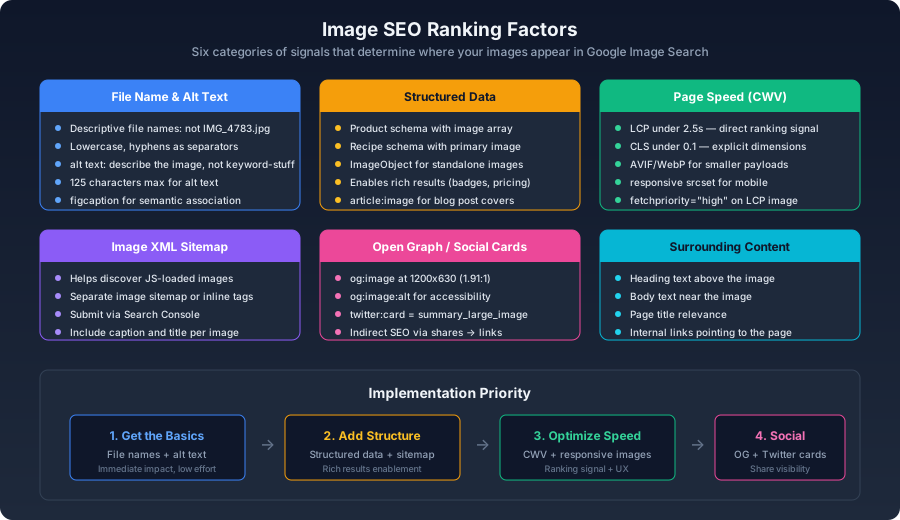
The Foundation: File Names and Alt Text#
File Names That Work#
IMG_4783.jpg communicates nothing. handmade-ceramic-coffee-mug-white.jpg tells the crawler exactly what the image depicts.bash1# Batch renaming2rename 's/IMG_/product-/' *.jpg
coffee_mug reads as one word coffeemug to Google). Hyphens are word separators.Alt Text That Helps#
The alt attribute exists primarily for accessibility — screen readers rely on it to describe images to users who cannot see them. Search engines treat it as the strongest textual signal for understanding image content:
html1<!-- Bad: keyword stuffing -->2<img alt="coffee mug buy coffee mug cheap coffee mug ceramic mug" />3 4<!-- Bad: empty of information -->5<img alt="image" />6 7<!-- Good: describes what's in the picture -->8<img alt="Handmade white ceramic coffee mug with glaze finish on wooden table" />
Three principles to follow:
- Describe the image content, not the page topic. The alt text should stand on its own as a description of what someone would see.
- Include relevant keywords naturally. If the image shows a pour-over coffee setup, the phrase "pour-over" belongs. If you have to force it in, the image probably isn't relevant to that keyword.
- Stay under 125 characters. Screen readers typically truncate beyond this point. Most images can be adequately described in well under the limit.
Surrounding Text Context#
Google also reads the text around your images. A heading above the image, a caption below it, the body paragraphs nearby — these all contribute to how the image is understood:
html1<figure>2 <img src="pour-over-brewing.avif" alt="Pour over coffee brewing with gooseneck kettle" />3 <figcaption>Step 3: Pour hot water in a slow, circular motion to evenly saturate the grounds.</figcaption>4</figure>
<figcaption> element creates a direct semantic association with the image. Google explicitly uses captions as a ranking signal for image search. A well-written caption carries more weight than the same text placed in a generic <div> or <span> a few lines away.Structured Data for Images#
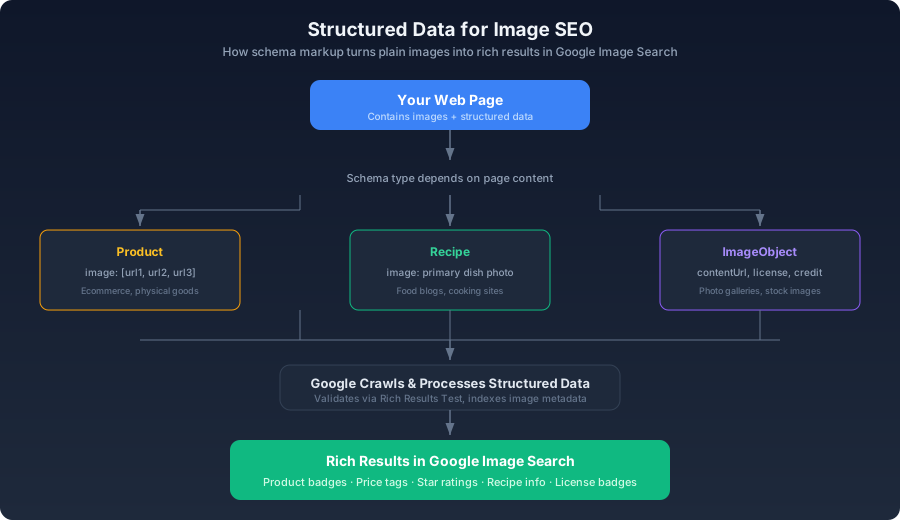
Structured data turns a plain image result into a rich result — with product badges, price tags, star ratings, or recipe metadata displayed alongside the thumbnail. These enhanced results consistently outperform plain image results on click-through rate.
ImageObject Markup#
For standalone images — photo galleries, stock photography, illustrations:
html1<script type="application/ld+json">2{3 "@context": "https://schema.org",4 "@type": "ImageObject",5 "contentUrl": "https://example.com/images/pour-over-brewing.jpg",6 "name": "Pour Over Coffee Brewing Technique",7 "description": "Step-by-step pour over coffee brewing with Hario V60 dripper and gooseneck kettle",8 "creditText": "Coffee Brewing Guide",9 "acquireLicensePage": "https://example.com/licensing"10}11</script>
acquireLicensePage field is worth including if you want Google to display a "Licensable" badge on your images — relevant for photographers and stock image sites that monetize through licensing.Product Schema with Images#
image field accepts an array of URLs:html1<script type="application/ld+json">2{3 "@context": "https://schema.org/",4 "@type": "Product",5 "name": "Handmade Ceramic Coffee Mug",6 "image": [7 "https://example.com/products/mug-front.jpg",8 "https://example.com/products/mug-side.jpg",9 "https://example.com/products/mug-detail.jpg"10 ],11 "offers": {12 "@type": "Offer",13 "price": "24.00",14 "priceCurrency": "USD",15 "availability": "https://schema.org/InStock"16 }17}18</script>
Google can display the product name, price, availability, and star rating alongside the image in search results. For ecommerce, this is among the highest-ROI SEO work you can do — it differentiates your listing from competitors who show up as plain blue links.
Recipe Images#
image field should point to the best finished-dish photo. Google often shows recipe images prominently in both web and image search, especially on mobile.Image XML Sitemaps#
A standard XML sitemap lists pages. An image sitemap tells Google about images that might not be discoverable through normal crawling — images loaded by JavaScript, images in galleries, images referenced through CSS:
xml1<?xml version="1.0" encoding="UTF-8"?>2<urlset xmlns="http://www.sitemaps.org/schemas/sitemap/0.9"3 xmlns:image="http://www.google.com/schemas/sitemap-image/1.1">4 <url>5 <loc>https://example.com/products/handmade-mug</loc>6 <image:image>7 <image:loc>https://example.com/products/mug-front.jpg</image:loc>8 <image:caption>Handmade Ceramic Coffee Mug - Front View</image:caption>9 <image:title>Handmade Ceramic Mug Front</image:title>10 </image:image>11 <image:image>12 <image:loc>https://example.com/products/mug-side.jpg</image:loc>13 <image:caption>Handmade Ceramic Coffee Mug - Side View with Handle Detail</image:caption>14 </image:image>15 </url>16</urlset>
<image:image> block can include a caption and title. These are optional but provide additional ranking signals.Generating Image Sitemaps Dynamically#
js1// Next.js route handler2export async function GET() {3 const products = await getProducts();4 5 const sitemap = `<?xml version="1.0" encoding="UTF-8"?>6<urlset xmlns="http://www.sitemaps.org/schemas/sitemap/0.9"7 xmlns:image="http://www.google.com/schemas/sitemap-image/1.1">8${products.map((p) => `9 <url>10 <loc>https://example.com/products/${p.slug}</loc>11 ${p.images.map((img) => `12 <image:image>13 <image:loc>${img.url}</image:loc>14 <image:caption>${img.alt}</image:caption>15 </image:image>`).join('')}16 </url>17`).join('')}18</urlset>`;19 20 return new Response(sitemap, {21 headers: { 'Content-Type': 'application/xml' },22 });23}
<image:image> blocks inside your regular sitemap, or keep a dedicated image sitemap if your regular one is already large.Page Speed as an Image SEO Signal#
Core Web Vitals are an explicit ranking factor. Since images are the dominant contributor to LCP and the primary cause of layout shifts, image optimization is image SEO:
- Serve AVIF or WebP to reduce payload size
- Use
srcsetandsizesfor responsive delivery - Apply
fetchpriority="high"to the LCP image - Always include
widthandheightattributes — they prevent CLS, which is both a UX issue and a ranking signal
A page with excellent images but an LCP of 6 seconds will rank behind a page with adequate images and an LCP of 1.8 seconds. Speed doesn't replace content quality, but it gates whether anyone sees it.
Open Graph Images for Social Sharing#
Social shares aren't a direct ranking factor — Google doesn't count likes or retweets. But the links and brand searches that result from widely-shared content do affect rankings. OG images are the thumbnail that appears when someone shares your URL:
html1<meta property="og:image" content="https://example.com/og/article-og.jpg" />2<meta property="og:image:width" content="1200" />3<meta property="og:image:height" content="630" />4<meta property="og:image:alt" content="How to compress images without visible quality loss" />5<meta property="og:image:type" content="image/jpeg" />6 7<meta name="twitter:card" content="summary_large_image" />8<meta name="twitter:image" content="https://example.com/og/article-og.jpg" />
The 1200×630px size (1.91:1 ratio) is the standard for nearly every social platform's link preview card. Going smaller means some platforms will fall back to a less prominent layout. Going larger wastes bytes with no visual benefit.
Where to Focus#
Image SEO rewards fundamentals more than tricks. Descriptive file names in lowercase with hyphens, accurate alt text on every image, and structured data that tells Google what each image represents — these are the foundations and they apply to every image on every page. Product, recipe, and article schemas turn plain image results into rich results with badges, pricing, and availability. An image XML sitemap catches images that normal crawling misses, especially those loaded through JavaScript. Open Graph and Twitter Card tags ensure shared URLs display proper thumbnails — not a direct ranking signal, but the links and brand searches that shares generate do affect rankings. And page speed ties it together: an image that ranks well on relevance but loads in six seconds will lose to an adequate image that loads in under two. Google Search Console's image search performance report reveals which images are bringing traffic and which could be doing more. Check it regularly — it's the closest thing to ground truth you'll get.