What Makes Ecommerce Images Different#
Blog images, when slow, cost you a reader. Ecommerce images, when bad, cost you a customer — and their trust. A Baymard Institute study found that 56% of users landing on a product detail page go straight to the images before reading anything else. The quality of those images is a direct proxy for product quality in the user's mind.
But there's a structural tension. A category page displays 20–60 product thumbnails. A product detail page (PDP) shows 3–8 full-size images. A single product might need its image served at three different resolutions across the shopping journey. The aggregate image payload on a category page can easily exceed 15MB — enough to push LCP past 6 seconds on a 4G connection.
The goal is not to compress as aggressively as possible. It's to preserve the detail that drives purchase decisions while eliminating the bytes that don't.
The Layered Variant Strategy#
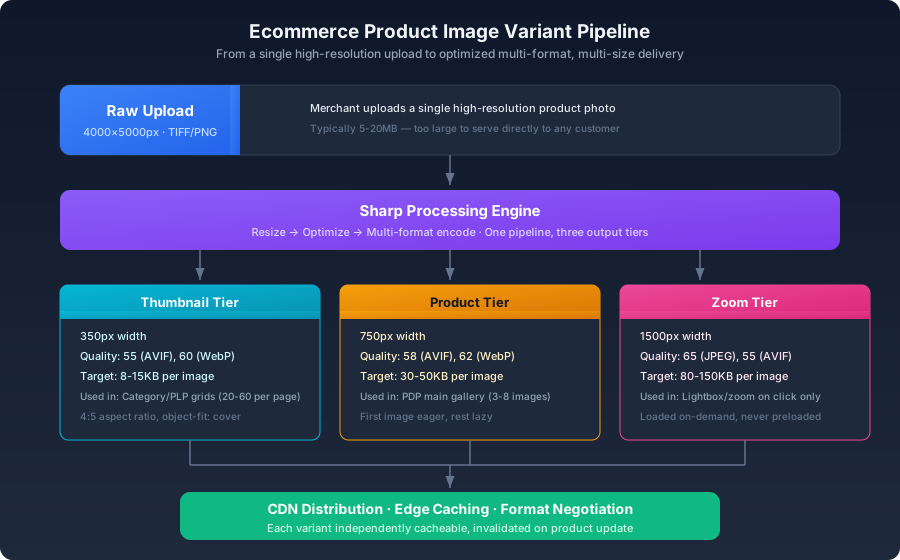
A single product photo serves three distinct roles. Each needs its own resolution and compression profile:
| Variant | Width | Quality | Target Size | Where It's Used |
|---|---|---|---|---|
| Thumbnail | 350px | AVIF 55 / WebP 60 | 8–15KB | Category grids, search results, related products |
| Product | 750px | AVIF 58 / WebP 62 | 30–50KB | PDP main gallery, quick view modals |
| Zoom | 1500px | JPEG 65 / AVIF 55 | 80–150KB | Lightbox, pinch-to-zoom |
Generating All Variants at Upload Time#
js1const sharp = require('sharp');2 3const PRESETS = {4 thumbnail: { width: 350, quality: 55, format: 'avif' },5 product: { width: 750, quality: 58, format: 'avif' },6 zoom: { width: 1500, quality: 65, format: 'jpeg' },7};8 9async function generateProductImages(inputPath, productSlug) {10 const results = [];11 12 for (const [preset, config] of Object.entries(PRESETS)) {13 let pipeline = sharp(inputPath).resize({14 width: config.width,15 withoutEnlargement: true,16 fit: 'inside',17 });18 19 switch (config.format) {20 case 'avif':21 pipeline = pipeline.avif({ quality: config.quality });22 break;23 case 'webp':24 pipeline = pipeline.webp({ quality: config.quality + 5 });25 break;26 case 'jpeg':27 pipeline = pipeline.jpeg({ quality: config.quality, mozjpeg: true });28 break;29 }30 31 const outputPath = `public/products/${productSlug}-${preset}.${config.format}`;32 await pipeline.toFile(outputPath);33 results.push({ preset, path: outputPath });34 }35 36 return results;37}
Zoom images use JPEG as the primary format for a practical reason: at 1500px, JPEG's encoding speed is significantly faster than AVIF, and the file size difference narrows at higher resolutions where both formats must allocate substantial bits to luminance detail. For ecommerce workflows where upload-to-availability latency matters, this is a pragmatic trade-off.
Category Page Optimization#
Category pages are the hardest image-loading problem in ecommerce. Forty thumbnails at 50KB each is 2MB — and that's already optimized. The page also has filters, headers, and tracking scripts competing for bandwidth.
Unified Aspect Ratio#
A consistent aspect ratio lets the browser pre-calculate layout space for every thumbnail before any image loads:
css1.product-grid {2 display: grid;3 grid-template-columns: repeat(auto-fill, minmax(240px, 1fr));4 gap: 16px;5}6 7.product-thumbnail {8 aspect-ratio: 4 / 5;9 object-fit: cover;10 width: 100%;11 background: var(--color-surface);12}
aspect-ratio, the browser renders each thumbnail at height 0 until the image arrives, then reflows the entire grid. On a page with 40 images loading asynchronously, this produces a cascade of layout shifts that destroys CLS and makes the page feel broken.Low-Quality Image Placeholders (LQIP)#
A blurred 16px placeholder prevents the "empty box" flash while the full thumbnail loads:
js1async function generatePlaceholder(imagePath) {2 const buffer = await sharp(imagePath)3 .resize(16)4 .blur(10)5 .avif({ quality: 20 })6 .toBuffer();7 8 return `data:image/avif;base64,${buffer.toString('base64')}`;9}
The resulting base64 string is typically 300–600 bytes. Inlined into the HTML, it renders instantly while the real image fetches in the background.
Product Detail Page Strategy#
Hybrid Loading: First Image Eager, Rest Lazy#
html1<!-- First product image — the PDP LCP candidate -->2<img3 src="/products/shirt-01-product.avif"4 srcset="/products/shirt-01-product.avif 1x, /products/shirt-01-zoom.avif 2x"5 alt="White cotton oxford shirt — front view"6 width="750"7 height="1000"8 loading="eager"9 fetchpriority="high"10/>11 12<!-- Remaining product images — deferred -->13<img14 src="/products/shirt-02-product.avif"15 alt="White cotton oxford shirt — back view"16 width="750"17 height="1000"18 loading="lazy"19/>20 21<img22 src="/products/shirt-03-product.avif"23 alt="White cotton oxford shirt — detail of collar"24 width="750"25 height="1000"26 loading="lazy"27/>
The pattern is simple: the first image the customer sees gets the critical path. Everything else waits. On a PDP with six product images, this cuts the initial image payload by roughly 80% while keeping the most important visual — the one the customer uses to decide whether to keep reading — instantly available.
Zoom Images: On-Demand Only#
Do not preload the 1500px zoom variant. It should only be fetched when the user explicitly requests it:
js1document.querySelectorAll('[data-zoom]').forEach((btn) => {2 btn.addEventListener('click', async () => {3 const img = new Image();4 img.src = btn.dataset.zoom;5 img.onload = () => showLightbox(img);6 });7});
Preloading all zoom variants for a 6-image PDP would download ~600KB of data that the majority of users never see. Click-to-load eliminates this waste entirely.
The Full Loading Strategy#
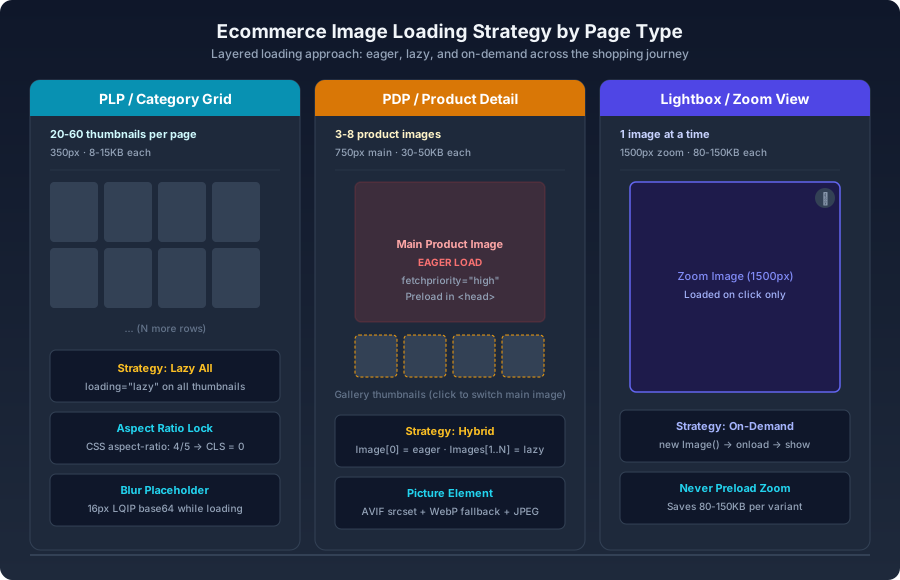
The diagram maps the loading strategy across the three core ecommerce page types. The pattern that emerges is a consistent escalation of priority as images move closer to the user's focus:
- PLP: Everything lazy. The user is scanning, not committing. Delay all image loads.
- PDP: One eager, the rest lazy. The user has expressed intent. Give them the hero image immediately.
- Lightbox: On-demand only. The user has asked for detail. Give it to them now, and only now.
Mobile-Specific Considerations#
Over 60% of ecommerce traffic comes from mobile devices. Several adjustments are warranted:
- Thumbnails capped at 250px. On a 375px-wide mobile screen, a 350px thumbnail offers no visible benefit. Use
srcsetwithsizesto serve the appropriate resolution. - No 2x product images on mobile. The
sizesattribute handles this — serve 1x on small screens, 2x only on desktop where the rendered size is larger. - Zoom images capped at 1200px on mobile. A 5-inch screen cannot meaningfully display more detail than 1200px provides.
html1<img2 srcset="3 /products/shirt-01-350.avif 350w,4 /products/shirt-01-750.avif 750w,5 /products/shirt-01-1500.avif 1500w6 "7 sizes="8 (max-width: 480px) 350px,9 (max-width: 1024px) 750px,10 750px11 "12 src="/products/shirt-01-750.avif"13 alt="Product image"14/>
Upload-to-CDN Automation#
Server-Side Processing at Upload#
js1async function handleProductImageUpload(req, res) {2 const { buffer, originalname } = req.file;3 const productSlug = req.body.slug;4 5 await generateProductImages(buffer, productSlug);6 7 const variants = ['thumbnail', 'product', 'zoom'];8 const formats = ['avif', 'webp', 'jpeg'];9 10 const uploads = [];11 for (const variant of variants) {12 for (const format of formats) {13 const filePath = `products/${productSlug}-${variant}.${format}`;14 if (fs.existsSync(filePath)) {15 uploads.push(uploadToCDN(filePath, `products/${productSlug}/${variant}.${format}`));16 }17 }18 }19 20 await Promise.all(uploads);21 // Respond to merchant: upload complete, all variants generated22}
CDN-Level Image Transformation#
If you're on imgix, Cloudinary, or Cloudflare Images, skip pre-generation and use URL parameters:
text
q_auto is Cloudinary's content-aware quality selector — it analyzes each image and picks a quality level that minimizes file size without introducing visible artifacts. The typical saving is 30–50% over a fixed quality setting, because the algorithm adapts to image content rather than applying a uniform rule.Ecommerce Image SEO#
alt text directly affects visibility in Google Image Search, which drives meaningful traffic for ecommerce:html1<!-- Weak: generic, no product context -->2<img alt="product image" />3 4<!-- Strong: product name, key attributes, identifier -->5<img alt="Men's Classic Fit Oxford Shirt in White — Front View — SKU: MCO-001" />
Product structured data with the image property:html1<script type="application/ld+json">2{3 "@context": "https://schema.org/",4 "@type": "Product",5 "name": "Men's Classic Fit Oxford Shirt",6 "image": [7 "https://example.com/products/shirt-01.jpg",8 "https://example.com/products/shirt-02.jpg",9 "https://example.com/products/shirt-03.jpg"10 ],11 "offers": {12 "@type": "Offer",13 "price": "89.00",14 "priceCurrency": "USD"15 }16}17</script>
Google uses this structured data to display product images directly in search results, which can significantly improve click-through rates from organic search.
Tying the Strategy Together#
fetchpriority="high" while the remaining gallery images stay lazy. Zoom variants should never preload; they load on click, because most customers never request them and the bytes they'd consume are pure waste. Every image carries descriptive, product-specific alt text that serves both accessibility and SEO. Structured data maps the full image array so Google can display rich product results. Mobile devices receive appropriately sized variants — never more resolution than their screens can physically resolve. All variants live on a CDN with proper cache headers, making the infrastructure fast by default rather than fast by manual effort.