Does Lazy Loading Actually Improve Performance?#
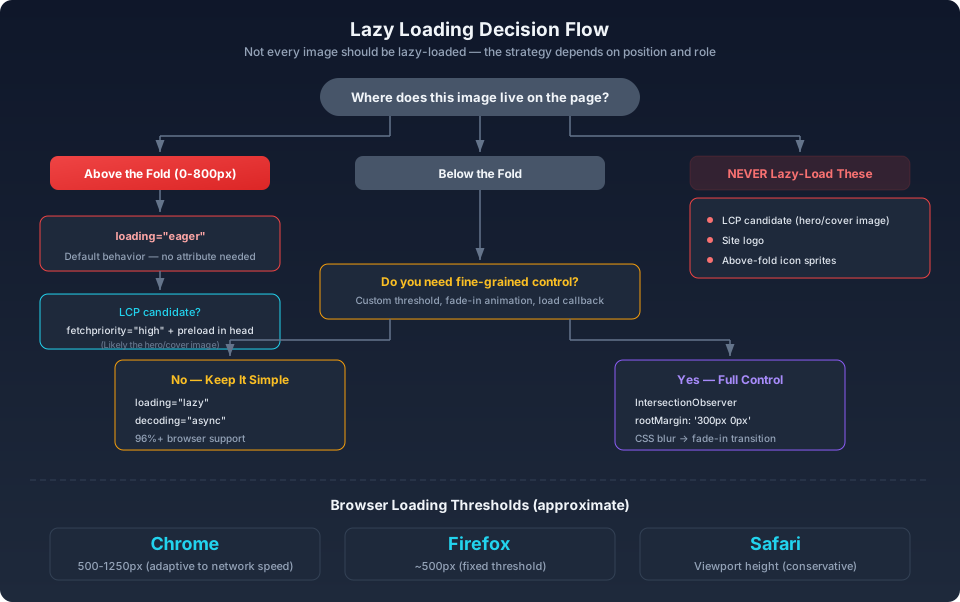
<img loading="lazy">, it cannot immediately issue the request — it must first evaluate whether the image falls within the viewport. This introduces a decision delay. Google's own data shows that lazy-loading an LCP image can add 500ms or more to the LCP timing.Below the fold, the calculus flips. Users may never scroll to the bottom of a long article or a paginated category grid. Downloading images they'll never see wastes bandwidth on their side and server egress on yours. For article pages and product listing pages, lazy loading typically cuts initial image bandwidth by 30–70%.
Native Lazy Loading: Use It Unless You Can't#
html1<img src="blog-image.avif" loading="lazy" alt="Article diagram" />
That's the whole API. Browser support passed 96% in 2024. No JavaScript, no polyfill, no library.
The Loading Distance Threshold#
Browsers begin loading lazy images before they enter the viewport — the exact distance varies by implementation and is not specified in the standard:
- Chrome: roughly 500–1250px, adjusted dynamically based on effective connection type. On fast connections, it preloads more aggressively.
- Firefox: approximately 500px, relatively consistent across connection types.
- Safari: approximately one viewport height, the most conservative of the three.
The thresholds are generous enough that images typically finish loading before they scroll into view, even with fast scrolling. The browser isn't waiting until the last pixel — it's anticipating.
What Native Lazy Loading Won't Do#
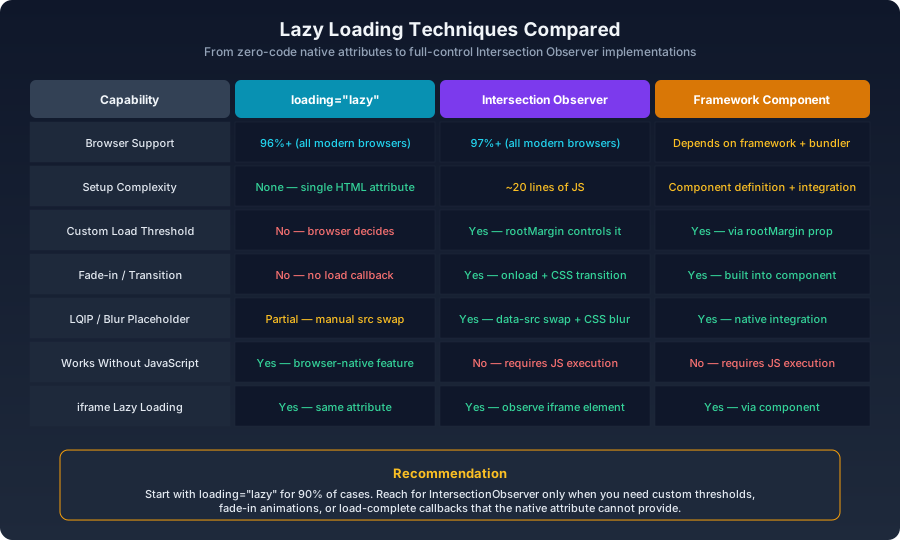
- No custom threshold. You cannot tell the browser "wait until this image is 200px from the viewport."
- No load-complete callback. No event fires when the image finishes loading. You cannot trigger a fade-in animation or update surrounding UI state.
- No visibility tracking. You cannot know whether a lazy image was ever actually viewed.
- iframe support exists but behaves differently.
loading="lazy"works on iframes, but the loading distance threshold may differ from images.
Intersection Observer: When You Need Control#
The Intersection Observer API gives you an explicit callback when an element's visibility relative to a root element (or the viewport) crosses a threshold:
js1function createLazyImage(img) {2 const observer = new IntersectionObserver(3 (entries) => {4 entries.forEach((entry) => {5 if (entry.isIntersecting) {6 const el = entry.target;7 8 if (el.dataset.src) {9 el.src = el.dataset.src;10 }11 if (el.dataset.srcset) {12 el.srcset = el.dataset.srcset;13 }14 15 el.onload = () => el.classList.add('loaded');16 17 observer.unobserve(el);18 }19 });20 },21 {22 rootMargin: '200px 0px',23 threshold: 0.01,24 }25 );26 27 observer.observe(img);28}29 30document.querySelectorAll('img[data-src]').forEach(createLazyImage);
rootMargin: The Preload Lever#
rootMargin expands or shrinks the observer's effective viewport rectangle. Think of it as growing an invisible margin around the viewport where intersections start counting:js1// Conservative — image only loads once it's actually in view.2// Users may see it loading.3{ rootMargin: '0px' }4 5// Balanced — preloads when the image is 300px away.6// Good default for most content pages.7{ rootMargin: '300px 0px' }8 9// Aggressive — preloads 800px ahead.10// Works for long articles where users scroll quickly.11// Trade-off: more bandwidth used for images that may never be seen.12{ rootMargin: '800px 0px' }
'top right bottom left'. For vertical scrolling, only the top and bottom values matter.Pairing with content-visibility#
content-visibility: auto tells the browser it can skip rendering work for off-screen elements. It's not lazy loading, but it complements it:css1.article-section {2 content-visibility: auto;3 contain-intrinsic-size: auto 500px;4}
contain-intrinsic-size property provides an estimated height so the scrollbar doesn't jump around as sections get laid out. Without it, content-visibility can create a disorienting scroll experience where the page "grows" unpredictably.Placeholder Strategies#
The most common lazy-loading UX problem is images popping into existence abruptly. A low-quality placeholder (LQIP) smooths the transition.
CSS Blur Technique#
css1.lazy-img {2 filter: blur(20px);3 transform: scale(1.1); /* blur creates transparent edges, scale hides them */4 transition: filter 400ms ease, transform 400ms ease;5}6 7.lazy-img.loaded {8 filter: blur(0);9 transform: scale(1);10}
html1<img2 src="data:image/webp;base64,UklGRiIAAABXRUJQVlA4..."3 data-src="real-image.avif"4 class="lazy-img"5/>
The inline base64 is a 16px-wide version of the image, blurred and encoded at extremely low quality. It's typically 300–600 bytes. The browser paints it instantly, then the real image replaces it with a blur-to-sharp CSS transition.
Dominant Color Placeholder#
For product photos on white backgrounds, a 16px thumbnail is overkill. Extract the average color and use a solid fill:
js1import { getAverageColor } from 'fast-average-color-node';2 3async function getPlaceholderColor(imagePath) {4 const color = await getAverageColor(imagePath);5 return color.hex; // e.g., '#f5f0eb'6}
Solid-color placeholders are effectively free (a CSS background value) and completely eliminate the "image pop-in" effect.
Techniques at a Glance#
Framework Implementations#
React#
tsx1import { useEffect, useRef, useState } from 'react';2 3function LazyImage({ src, alt, ...props }: { src: string; alt: string }) {4 const imgRef = useRef<HTMLImageElement>(null);5 const [loaded, setLoaded] = useState(false);6 7 useEffect(() => {8 const el = imgRef.current;9 if (!el) return;10 11 const observer = new IntersectionObserver(12 ([entry]) => {13 if (entry.isIntersecting) {14 el.src = src;15 observer.unobserve(el);16 }17 },18 { rootMargin: '300px' }19 );20 21 observer.observe(el);22 return () => observer.disconnect();23 }, [src]);24 25 return (26 <img27 ref={imgRef}28 alt={alt}29 {...props}30 onLoad={() => setLoaded(true)}31 className={loaded ? 'loaded' : 'loading'}32 />33 );34}
What Should Never Be Lazy-Loaded#
These must load immediately, every time:
- The LCP image. Almost always the hero or cover image. Lazy-loading it can add 500ms+ to LCP.
- The site logo. Usually small, needed on every page, often the first
<img>in the DOM. - Above-the-fold icon sprites. Uncommon in modern setups, but if you use them, they need to be available immediately.
- CSS
background-imageon above-the-fold elements. Browsers do not lazy-load CSS backgrounds. They load when the CSS rule matches, which means immediately if the element is in the viewport.
loading="eager" (or just omit the attribute — eager is the default).Verifying Your Lazy Loading Setup#
index.htmlorparser— the image was found directly in the HTML and loaded immediately. Not lazy-loaded.- A script name like
lazy-load.js— the image was loaded by your JavaScript. Lazy loading is working. - The timing in the waterfall view should show body images loading after the initial page resources, often in clusters as you scroll.
Summary#
| Scenario | Approach |
|---|---|
| Simplest case, no special needs | loading="lazy" |
| Need fade-in animation | Intersection Observer + CSS transition |
| Need custom preload distance | Intersection Observer + rootMargin |
| Need placeholders | 16px LQIP base64 + blur transition |
| Reusable across a framework | LazyImage component wrapping observer logic |
loading="lazy" as a blanket default on every <img> is worse than not using it at all.