A Photo Carries More Than You Think#
You took a picture of your coffee and posted it online. You shared a latte. The file you uploaded also shared:
- GPS coordinates precise enough to identify your home or the floor of your office building
- The exact time the photo was taken, down to the second
- Your phone model and operating system version
- Camera settings (aperture, shutter speed, ISO)
- The name and version of any editing software you used
- A thumbnail that may contain parts of the frame you cropped out
In 2012, authorities located John McAfee using GPS coordinates embedded in a photo published by a journalist. That case made headlines, but it wasn't unique — metadata has exposed locations, identities, and confidential information countless times since. The mechanism is built into every smartphone camera and silently writes to every JPEG it produces.
The Four Layers of Image Metadata#
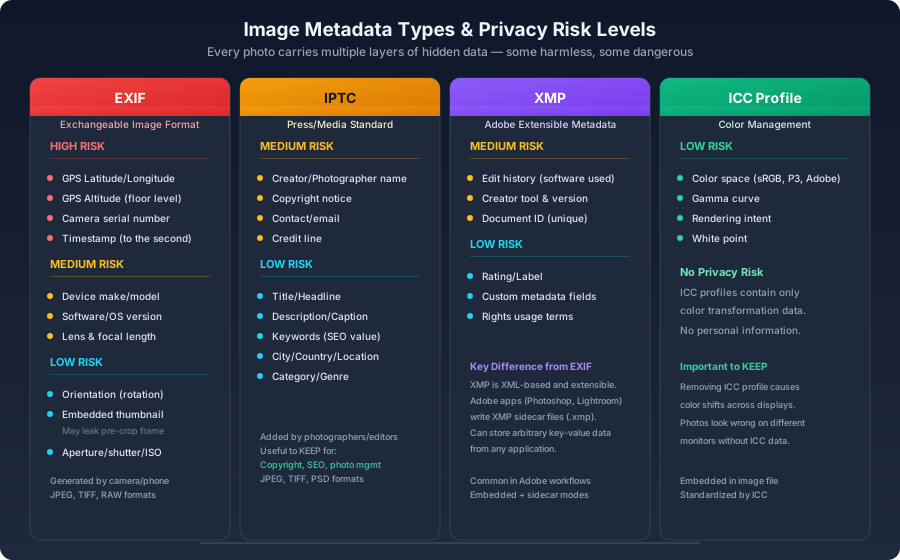
Image metadata is stored across several standards, each with its own structure and purpose:
| Standard | Full Name | What It Carries |
|---|---|---|
| EXIF | Exchangeable Image File Format | Camera settings, GPS coordinates, timestamp, thumbnail |
| IPTC | International Press Telecommunications Council | Copyright, creator name, description, keywords |
| XMP | Extensible Metadata Platform | Adobe-defined XML metadata, edit history, custom fields |
| ICC Profile | International Color Consortium | Color space, gamma, rendering intent |
EXIF is the layer that matters for privacy. It's written automatically by cameras and phones. IPTC and XMP are typically added by humans — photographers captioning their work, editors adding rights information. ICC profiles are purely technical and carry no personal data, but you need them for accurate color rendering.
What ExifTool Reveals#
bash
The output can run to dozens or hundreds of lines. The privacy-relevant subset:
bash
The Embedded Thumbnail Problem#
Many cameras and phones embed a small JPEG thumbnail inside the EXIF data. This thumbnail is generated at capture time, before any cropping or editing. If you cropped the original — to remove something at the edge of the frame, to recompose — the embedded thumbnail may still contain the full, uncropped image:
bash1# Extract the embedded thumbnail2exiftool -b -ThumbnailImage photo.jpg > thumbnail.jpg
This has caused documented privacy incidents. Someone posts a cropped photo, and the thumbnail reveals what was outside the crop boundary.
Removing Metadata#
ExifTool Bulk Stripping#
bash1# Remove everything except the ICC color profile2exiftool -all= -overwrite_original photo.jpg3 4# Recursive — entire directory5exiftool -all= -overwrite_original -r ./photos/6 7# Surgical — remove only GPS and camera info, keep copyright8exiftool -GPS*= -Make= -Model= -Software= -overwrite_original photo.jpg
-all= flag wipes all metadata. The -overwrite_original flag modifies the file in place rather than creating a backup copy with _original appended.Sharp in Node.js#
js1const sharp = require('sharp');2 3async function stripMetadata(inputPath, outputPath) {4 await sharp(inputPath)5 .withMetadata({})6 .toFile(outputPath);7}
withMetadata({}) tells Sharp to drop all EXIF, IPTC, and XMP data. It preserves orientation information — without it, portrait photos may display sideways.Client-Side Stripping via Canvas#
js1function stripExifInBrowser(file) {2 return new Promise((resolve) => {3 const img = new Image();4 const canvas = document.createElement('canvas');5 const ctx = canvas.getContext('2d');6 7 img.onload = () => {8 canvas.width = img.naturalWidth;9 canvas.height = img.naturalHeight;10 ctx.drawImage(img, 0, 0);11 12 canvas.toBlob((blob) => {13 resolve(new File([blob], file.name, { type: file.type }));14 }, file.type);15 };16 17 img.src = URL.createObjectURL(file);18 });19}
Canvas redraw is the nuclear option. The image gets re-rasterized and re-encoded through the browser's built-in codec. EXIF data is discarded in the process. The trade-off: you have no control over the compression settings used in the re-encode. For casual use it's fine; for production workflows, server-side processing with ExifTool or Sharp gives you more control.
What Platforms Do (and Don't Do)#
Don't rely on platforms to sanitize your images. Their behavior varies and can change without notice:
- Twitter/X claims it strips GPS data since 2016, but doesn't guarantee it's removing everything.
- Facebook/Instagram strip most EXIF on upload, but their processing is a black box.
- WhatsApp / iMessage typically preserve metadata when sending photos directly.
- Flickr / 500px intentionally retain metadata — photographers rely on it for copyright and attribution.
- Slack / Discord behavior is undocumented and inconsistent. Assume metadata survives.
The rule: if you want to be certain an image is clean, clean it yourself before it leaves your machine.
When Metadata Should Stay#
Metadata isn't inherently bad. There are legitimate reasons to keep it:
- Copyright: Photographers embed ownership and contact information in IPTC fields. Stripping it makes orphan works.
- Color accuracy: ICC profiles ensure an image looks the same on different displays. Without one, browsers default to sRGB, which may shift colors visibly.
- Photo management: Lightroom and similar tools use metadata for search, filtering, and organization. Wiping it breaks these workflows.
- SEO: Some search engines read IPTC keywords and descriptions, though the effect on ranking is modest.
Targeted removal preserves what's useful:
bash1# Remove only the privacy-sensitive fields2exiftool \3 -GPS*= \4 -Make= -Model= -SerialNumber= \5 -CameraOwnerName= \6 -overwrite_original photo.jpg
Building an Upload Sanitization Pipeline#
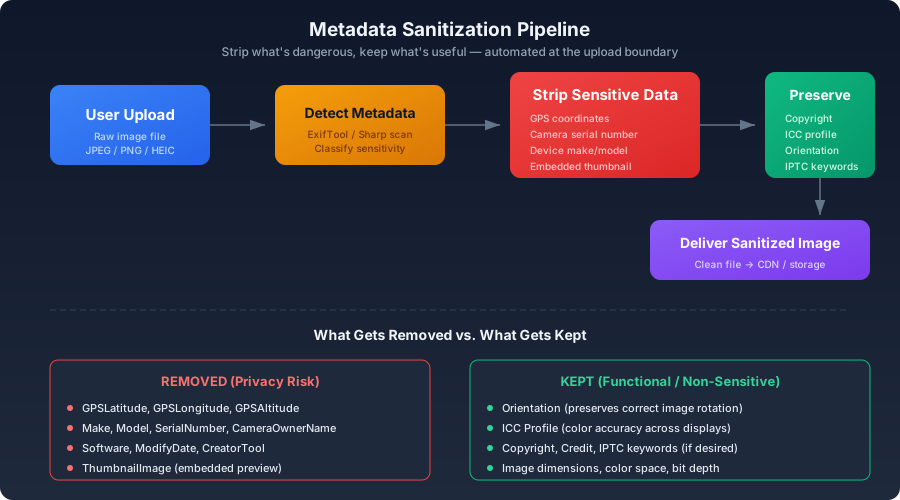
If your application accepts image uploads, strip metadata at the ingestion point — before the file reaches storage:
js1async function sanitizeUpload(fileBuffer) {2 const metadata = await sharp(fileBuffer).metadata();3 const orientation = metadata.orientation;4 5 return sharp(fileBuffer)6 .withMetadata({ orientation })7 .toBuffer();8}
This keeps orientation (so photos aren't sideways on screen) while discarding everything else. The file that reaches your storage layer contains only pixel data and color information — nothing traceable back to the person who took it.
Building Privacy into the Pipeline#
Metadata hygiene should be automatic, not something users remember to do. Upload endpoints need to strip metadata at ingestion — the file that reaches storage should contain pixel data, color information, and nothing traceable. GPS coordinates, camera serial numbers, device identifiers, and embedded thumbnails are privacy liabilities with no legitimate web use case. Copyright information and ICC color profiles, on the other hand, serve real functions and should survive the cleaning process. The distinction is simple: if it identifies a person, a device, or a location, it goes. If it helps display the image correctly or attributes the creator, it stays. And the embedded thumbnail — always check it before publishing. It has burned people before, and it will again.